We have looked at using Project, and using Areas, now it’s time to move on to Resources. If Projects represent the Now efforts, Areas the soon efforts, then Resources are the future. While I understand the productivity boost of PARA, the reality is the Resources are is my favorite part of the system.
I wrote a long blog post about my personal history coming to this point, which you can read here. However, for the sake of brevity let me give you some examples of you can do with Resources, and what I spend the most of my time doing.
12 Interesting Questions
To paraphrase the famous physicist Richard Feynman, “Everyone should have 12 interesting questions they are always working on.” His premise is that it is our curiosity that leads to creativity. It is hard to know when something will be useful, but in Feynman’s experience, the things we are interested in always have a way of making themselves useful.
With that in mind, here are just a sample of the types of folders you might find in my 3 Resources Folder.
- 3D Printing
- AI
- The Bible
- Bourbon
- Buddhism
- Cooking
- Dungeon World
- Esports Open
- Financial Modeling
- Humor
- Journaling
- Life Hacks
- Longevity
- Magic
- Management
- Marketing and Business
- Math
- Mental Models
- Mental Toughness
- Mindfulness
- Negotiation
- NodeJS
- One Bag Travel
- Origami
- Poetry
- Principles
- Python
- Skilled Helper
- Storytelling
- Video Games
- Whittling
- zettelkasten
Chances are, if I learn about it, it ends up in a Resources folder. But looking at that list it is actually hard to tell the true value I get from the system.
Resources compared to Areas and Projects
Resources are a lot like Areas and Projects in that they have a folder, a home note, and bunch of linked files. Where they differ is with how they are structured, and specifically how I integrated my reading, and learning.
Projects and Areas in general are meant to channel action and effort to produce results. Projects should create outcomes; Areas should support standards.
Visually, Projects and Areas are similar:
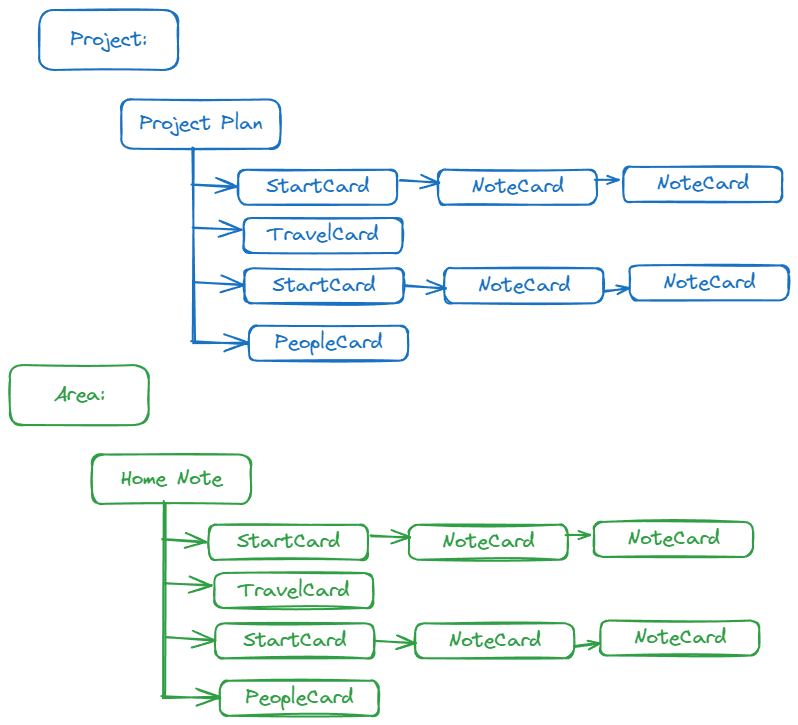
But what about resources? Resources fall into two broad categories.
- Things I don’t want to forget.
- Things I want to learn more about.
What I don’t want to forget
There’s a shocking number of little one-off things I have to do as an entrepreneur. It can be a process that I do one time, or something I do like once a quarter. But the issue is that I do it so infrequently, every time I sit down to do it, I can’t remember what I did before, and I find myself relearning the process all over again.
I use Resources to capture my tools and mindset when I did the work. The ideal is to preserve the workspace in such a way that when I have to come back to pick up that task again, I have a leg up. I can jump to reusing what I created without having to figure it all out again.
An example is, using R Studio to analyze attendance data from a spreadsheet. R Studio is awesome, but I don’t use it enough to know it very well. So my I captured how I learned to use it, to solve the problem I was trying to solve. Next time, I was able to go back, scan the files and pick up anew. This proved to be very helpful.
What I want to learn more about
However, for me, the greatest value of a personal knowledge management system is supporting me when I want to learn more about something I find interesting. For these topics, there is no specific goal or outcome I’m trying to achieve. Instead, I am trying to learn. That may sound simple, but the real value for me with Resources that this gave me a way to begin to finally leverage all the reading and podcast listening I was doing.
Visually however, Areas end up looking quite different from both Projects and Areas…
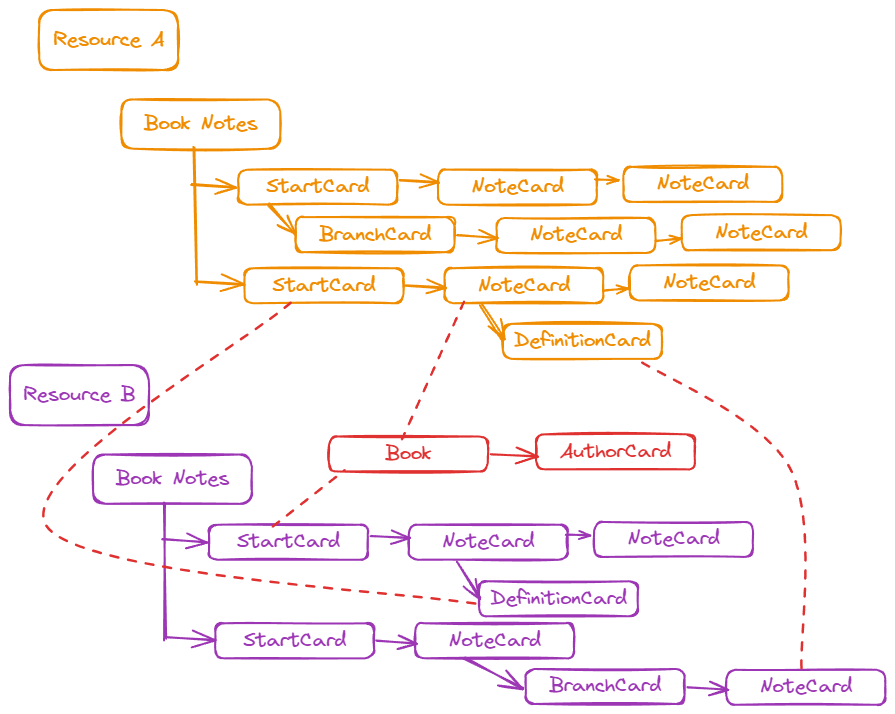
The reason is that Resources, especially when it comes to knowledge, have many more links than projects and areas. What’s more those links cross more kinds of notes. Where Projects and Areas benefit from a focused mindset, resources benefit from an open mindset.
In the next post, I’ll show you an example.