I had never seen an app so good at preventing me from using it. From the moment I opened the thing, it assaulted me with dialog boxes clamoring for me to “collect my coins” for “returning,” as if the single most important thing I could do in my life was to open this freaking application. One dialog box was annoying enough, but that was not all. They had added a “mana meter.”[1] Seriously? A tree with a bright blue pool showed an animation of water splashing into it because… you guessed it, I had opened the app. Are you kidding me? I tried to click away from and around the stupid modal dialog box with pretty graphics, not succeeding until I found the fiendishly small X hidden in the upper right hand corner of the tree graphics.
After an exasperated moment, thinking, “well that sucked,” I started to poke around the app to solve the problem I needed the program to solve. And I couldn’t find it. Ultimately, I had to turn to Claude to ask for help on how to get this application to do the thing I needed it to do.
If only the developers had put more time into thinking through what their users were trying to do, and making that more accessible and easier to do.
Yet, it seems to me that when most people think of gamification, that’s what they think of. Game-like interface elements stretched over an otherwise unappealing application. This, in my mind, is the participation award of user interface design. “Yeah you’re using it!!!”
Who. Cares.
Seriously?
Who cares? I use apps to solve a problem, and unless the application is a game, I find most of these bells and whistles to be a distraction. However, that does not mean you cannot use video game principles to improve software.
I’ve spent more than two decades in the video game industry, and the development of the fifteen-some video games I worked on[2] taught me some lessons on making software compelling and fun to use. In my opinion the sparkly bits are the least important part of Gamification. They still matter, but not as much as what I call the big three.
Three Principles of Gamification
These are more guidelines than rules, but when I sit down to think about how to create tools for my teams to work, this is how I think about it.
The First Principle is to have Clear Expectations. Does the person using the app know what they are supposed to achieve? Do they understand the desired outcome?
The Second Principle is Transparent Skills. Does the player know how they are expected to achieve it? Do they know what decisions, resources, or actions are required to fulfill the expectations.
The Final Principle is Timely Feedback. Is the user getting clear and accurate feedback fast enough to act on it? This can take the form of displays or dashboards (weak) or in-game visualizations (best). The person playing needs to know at all times where they stand relative to achieving their goal.
When you design interactive software with Clear Expectations, Transparent Skills and Timely Feedback, users often experience this as engaging. Put another way, you want to make sure the user knows what they are supposed to do, how they are supposed to do it, and can feel like they are making progress as they work.
Gamification as I understand it solves for those constraints.
Let me give you some examples, from video games and from work, to make it clear.
Example: MVP Baseball
One of the moments this became clear to me was playing MVP Baseball 2004. The Diamondbacks had won the World Series a few years before in 2001, so the 2003 roster was still a very good team.[3] I was coaching little league, and I liked to play this baseball sim on my PlayStation before practice. I chose the DBacks (hometown fav). They were trailing the Rockies 1-0 in the bottom of the third with two outs. I had a runner on second. I still remember thinking, “If you throw me a curve ball I’m going to park you.” I watched the pitcher wind up and throw a high arcing curve ball toward home plate. I grinned. I read the pitch perfectly and smashed the ball with a perfectly timed swing, sending it into the pool.[4] I fist pumped as the game showed my players rounding the bases for my two-run homer.
I felt like a champion. But what did I actually do?
I looked at a screen and pressed a button at the right time. That was it. Yet at that moment, I felt like I had hit a home run. The game had put me in a simulation of the moment a player might experience. I could recognize the situation. What’s more, the game displayed the pitch by rendering a ball. The graphics were tuned just right so a player of average[5] skill could identify the pitch in time to hit it. Thus, I hit the right button at the right time to get the desired outcome.
Everything I needed to know to make a good decision was happening in front of me, in the game.
If you sit down and start looking at most AAA video games, you will find this pattern repeated over and over again, sometimes simple, like MVP, other times more complex, like Baldur’s Gate, but the pattern is there. Great games make sure you know what to do, how to do it, and give feedback necessary to execute.
You expect this from video games, but how do you apply it at work?
What Does This Look Like at Work?
Thanks to the help of Claude, I could sit down and build better tools for my team. It started with Clear Expectations. I wanted them to not only know what they needed to do, but to be able to visualize it. Second, they needed the proper skills to do the work, and finally, they needed Timely Feedback. I used these skills to think about how to help my team do a better job maintaining our GameTruck equipment.
I analyzed their current work flow. Tasks, lists, and… well that was kind of it. Field teams submitted work orders and the operations teams tried to grind through them.
What could go wrong?
For one, no one really knew the status of anything. A list of tasks is not a dashboard, and has no visualization. What’s more, it’s not obvious what skills you need to have to resolve what’s in the undifferentiated pile of tasks. Supply requests were mingled with mechanical repairs, mixed in with electronic troubleshooting. Oh, and everything was marked “urgent”. I learned from Michael Linenberger’s book Master Your Workday Now! that priority is a terrible way to differentiate tasks because everything is important to someone. Oh, and did I mention the task list was endless. There were always more requests. People seemed to add requests as fast as we could clear them.
In just about every way, this work flow violated gamification. You could not look at the pile and immediately tell what skills were required to resolve the issues. There was no meaningful feedback, but worst of all, no one could honestly tell if we could meet our core expectation: could the equipment fulfill our commitments?
My tool started with Clear Expectations. Why were we doing all of this work? So we could keep our promise. We needed to make sure the equipment was ready to run on the weekend. What skills would be required to achieve this? We needed Transparent Skills. In my mind, that meant sorting the work by equipment. Pickup truck tasks in one pile, generator tasks in another, and trailer work orders in a third pile. Finally, I asked how can I make the status timely and obvious? The answer jumped out at me. Create a dashboard for our equipment that reflects readiness.
Initially, I called it the Ready to Ride dashboard, but now it goes under the oh so sexy name of portal equipment dashboard.[6] But the core idea was that at a glance, anyone would look at the dashboard, tell the state of the equipment and quickly figure out where to put their time and attention.
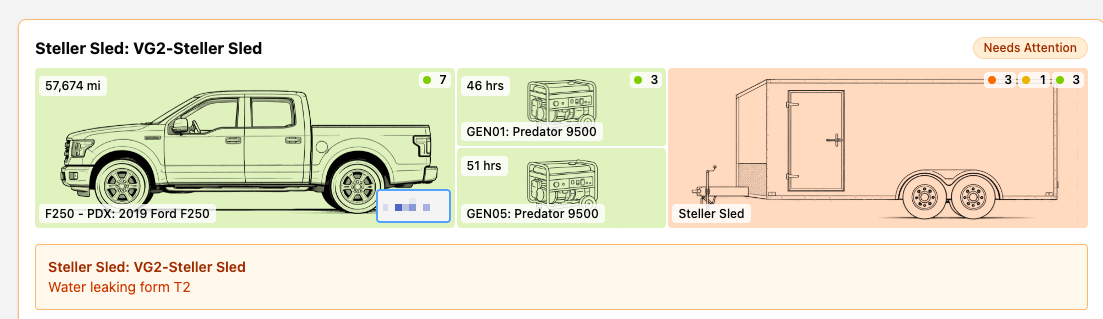
Not only did organizing the work this way lead to greater efficiency and effectiveness, and reduced stress because everyone could see the state of the equipment at a glance. Now that’s timely feedback. Because the work was organized by equipment, people intuitively knew what skills would be required to address the problems. Generator technicians for generator problems, Dealership for most truck problems, and one of two teams to handle trailer issues. Everything inside the trailer was handled by our team, everything outside by our trailer mechanic. The required skills had become transparent.
Finally, if you were expected to run a video game party, you can look at this dashboard and immediately know which truck to take. The green one.
Notice what I did not add to that tool? No coin fountains. No mana pools. No animated graphics.
I “gamified” the work.
Your Turn
You’ve seen me do it. Now do you think you can? Forget about coins and mana fountains. Do people know what is expected? Do they have the skills and resources to do it? Do they have a method of timely feedback so they can tell where they stand?
When you start thinking like that, you are thinking like a game designer. At least, that is how I think about gamification. Give it a try and let me know how it goes. I’d love to hear from you.
- In case you didn’t know, in fantasy games - board and video - mana is the fuel you need to cast spells.↩︎
- My gameology is fifteen published video game titles for Nintendo, PlayStation, and Xbox with Rainbow Studios and Disney’s Fall Line Studio, plus I’ve been running GameTruck since 2006.↩︎
- EA used the 2003 roster for the 2004 version of the game. That was pretty standard; using current rosters became a thing once more and more consoles had online access.↩︎
- Now Chase Field, then Bank One Ball Park, famously has a pool behind the right field fence.↩︎
- Okay middling↩︎
- What it does, and how it works, is so much more important than what it is called.↩︎